
Activate a wireless gauge
A wireless gauge (R1, R2, R5, R10…) takes and sends its measurements on its own. To put it into service, you choose in the app when it measures and when it sends its measurements, then you switch it on on site.
1. Set up the gauge in the app
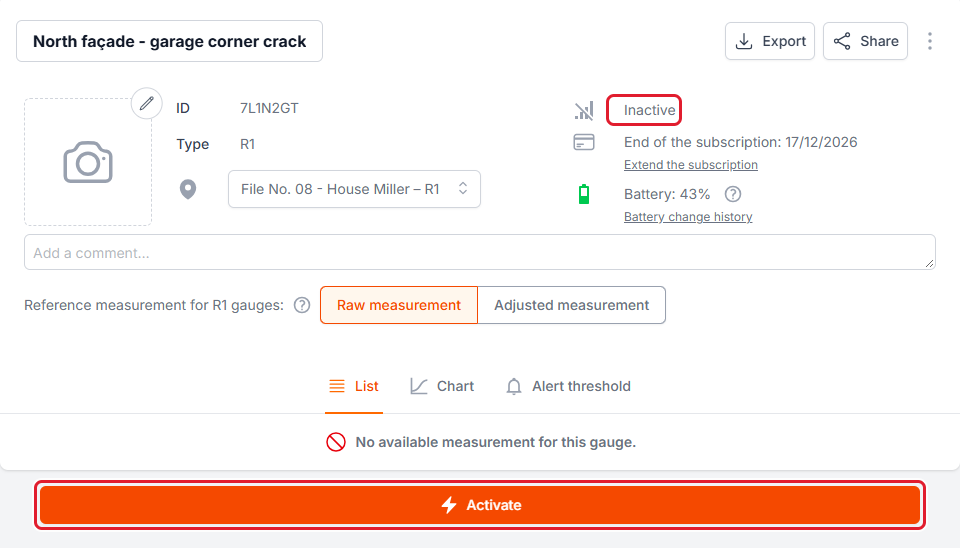
- Add the gauge to your workspace (see Add a gauge to your workspace). → On the gauge page, its status is Inactive.
- Click Activate.
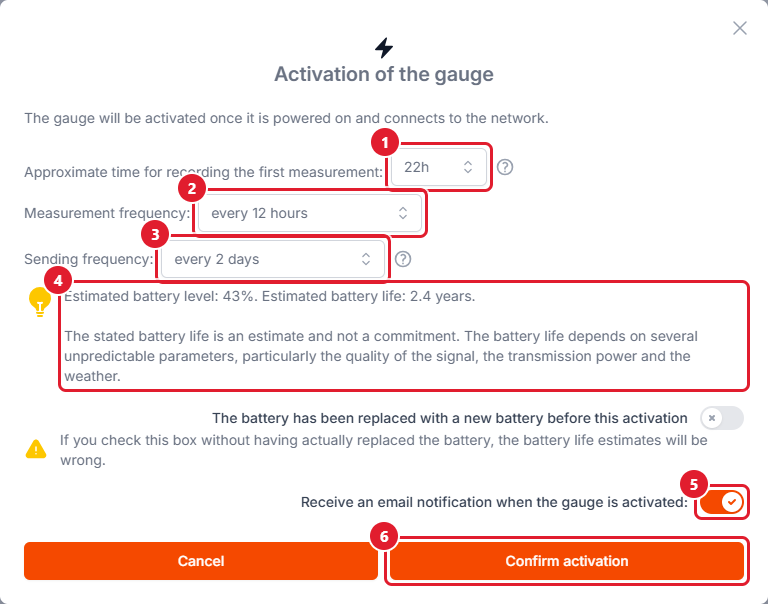
- Choose:
- the Approximate time for recording the first measurement (1). If this time has already passed when the gauge is switched on and retrieves its settings, the measurement series starts the next day at that time;
- the Measurement frequency (2): how often the gauge measures;
- the Sending frequency (3): how often it sends its measurements. The more often it sends them, the faster its battery runs down. The estimated battery life is displayed below (4).
- Leave the Receive an email notification when the gauge is activated option turned on (5).
- Click Confirm activation (6). → The message "Initialisation set." appears, and the status of the gauge changes to Initialising….
2. Switch on the gauge on site
Switch on the gauge next to where it will be installed:
- Piston gauges (R1…): turn the piston head a quarter turn. The piston opens and switches on the gauge.
- Gauges with a housing (R2, R2.P, R5, R10…): open the housing by unscrewing the 4 cover screws (3 mm hex key), flip the switch, then close the housing without moving the gasket.
The LED of the gauge shows you what it is doing:
| LED | What the gauge is doing |
|---|---|
| Lit continuously | It is starting up (a few seconds). |
| Flashing slowly | It is searching for the network. |
| Flashing rapidly | It is communicating with the app and retrieving its settings. |
| Off | It is ready and goes to sleep until its next measurement. |
3. Check that the gauge is active
Once the gauge has retrieved its settings:
- its status changes to Active, and you receive a confirmation email;
- its measurements then arrive at the sending frequency you chose.
The gauge was switched on before being activated
Without settings, the gauge goes to sleep after 5 minutes, then wakes up every 8 hours to check whether it has been activated. The app tells you so, with the time of the next wake-up: "Gauge powered on at … It will wake up around … to activate."
- Activate it as above: it will retrieve its settings at its next wake-up.
- To avoid waiting: once activation is confirmed, switch off the gauge, wait at least 30 seconds, then switch it back on.
- Piston gauges: close the piston with the quarter turn, then open it again.
- Gauges with a housing: turn off the switch, then turn it back on.
If you cannot activate the gauge quickly, switch it off: it will not drain its battery unnecessarily.